How Defrag98 Works
Defrag98 is a recreation of the Microsoft Windows 98 Disk Defragmenter that runs in a browser. This document covers what the simulation does and the numbers it does it with. None of the cluster movement is a recorded animation: every pass works out what to do from the state of the drive in front of it.
The cluster grid
The grid is the Windows 98 defrag screen most people remember. A drive is one flat array of clusters. Each one is in exactly one of four resting states, drawn in the palette sampled from the original legend:
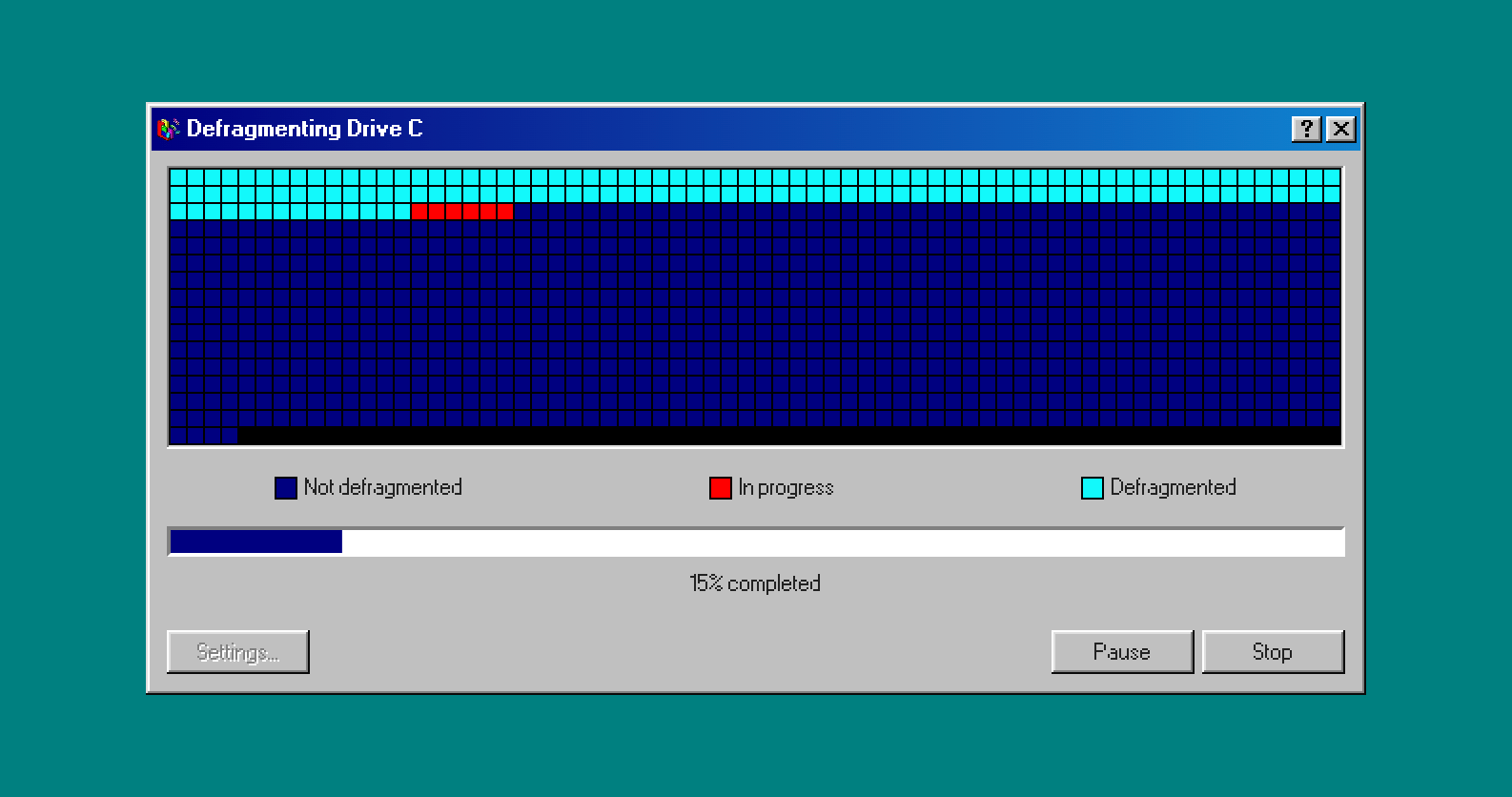
- Free space, white
- Unoptimized data, light blue
- Optimized data, dark blue
- Data that will not be moved, white with a corner mark
Each ordinary pass shows its reads in green, then its writes in red, before the clusters settle into their resting colors. A run optimized in place goes from light blue to green to red to dark blue. When data moves forward, its old cells turn white as the destination settles dark blue.
The layout and progress change after the write flash. Pause freezes the current phase; Resume continues it. Stop clears the flashes and keeps the last committed layout, discarding a move that has not finished writing. The last pass settles before the completion box opens.
Changing the sound settings or simulation mode keeps the cluster map and progress, including a paused phase. Selecting another drive or changing the custom drive's size or speed starts a fresh layout.
In the diagrams below, # is optimized, ~ is unoptimized, . is free.
Building a fragmented drive
A fresh drive is generated when the page loads, when you change drives or the custom drive's size or speed, and when you press Start after a completed run. Stop keeps the current layout and progress, so Start can continue the same drive. Two percent of clusters are scattered at random unique positions and marked unmovable. Sixty percent are then filled with data in contiguous runs of 12 to 48 clusters, dropped at random starting points that wrap around the end of the array and fill only the cells still free. The remaining thirty eight percent stay free.
Placement is capped at four attempts per cluster, so generation always terminates even when the last few runs cannot find room.
The frontier
Every pass begins by locating the frontier: the lowest index that is neither optimized nor unmovable. That is the boundary of the consolidated region at the front of the drive. Consolidated data is written here; evictions can move unoptimized data further down the drive.
A free hole on its own stops counting as a frontier once no unoptimized data is left anywhere ahead of it. Without that rule the defragmenter would chase gaps forever and never finish. The simulation keeps counts of optimized and unoptimized clusters as they change, so it can check for completion without counting the whole drive again.
The three moves
With the frontier located, a pass commits to exactly one of three moves. Which one depends on what is sitting at the frontier and on one coin flip.
1. Optimize in place
The frontier holds data, and that data already belongs where it is. The pass walks forward through the contiguous run and marks it optimized, reading and writing the same cells.
2. Relocate forward
The frontier is free space, so data has to be brought to it. The pass picks one unoptimized run at random from further down the drive and keeps using it across passes until it is exhausted or no longer ahead of the frontier. It drains the run from its tail: the read head walks backward through the run while the write head walks forward into the free frontier. Relocated clusters land already optimized.
Picking a run at random rather than scanning the drive back to front is deliberate. Windows 98 relocated whole files from wherever they happened to live, so the green read head jumped around the map. Draining one run from its tail reproduces that while keeping a single file's clusters moving together.
3. Evict out of the way
One pass in four, when the frontier holds data, the run is shoved somewhere else instead of being optimized. It reappears in a random free run further down the drive, still unoptimized, clearing the frontier so incoming data has room. This is what the real utility did before writing into a region.
Eviction is a probability, not a rule, which is what guarantees the defrag terminates: optimizing in place always stays reachable. If no free run exists ahead of the frontier the eviction is abandoned and the pass optimizes in place instead.
Evicted clusters flash green as they are read but nothing flashes red. The red write highlight is reserved for the consolidation zone, so red always means progress.
One move per pass, on purpose
A pass never mixes modes, and it never re-picks its source run halfway through. Both rules exist for the same reason: the green and red highlights have to read as solid contiguous blocks. Interleaving two modes would scatter them into confetti, which looks like a screensaver rather than a disk utility.
In Fast mode a pass moves at most 24 clusters, the ceiling the real utility used, and the count is rolled fresh each time somewhere between 1 and 24. It is clamped at the bottom because a random number generator can return exactly zero, and a pass that moves nothing would stall the whole run.
How long each pass takes
Each pass gets a time budget based on its planned work: one head seek, plus transfer time for every cluster moved, scaled by the drive's spindle speed relative to a 3600 RPM baseline, the speed of the slowest drive in the set. The mode multiplier is 1 in Fast mode and 3 in Realistic mode.
delay_ms = (200 + 60 * clusters moved) * (3600 / rpm) * mode_multiplier
Reading, writing and settled colors share that budget equally. Evictions have no red flash, so reading takes the write phase's share too. Splitting the animation into phases does not multiply the pass duration. Browser scheduling can make a run take longer, especially in a background tab.
Because the cluster count varies, so does the delay. The drive works in fits and starts, the way a mechanical one does, instead of ticking to a beat.
Rescans have their own timing. Each band uses the cost of an average pass, with a minimum delay to keep the restart message readable even on a fast drive.
Each of the four drives gets its own capacity and spindle speed:
| Drive | Capacity | Clusters | RPM | Fast pass | Fast run | Realistic run |
|---|---|---|---|---|---|---|
| C: | 2048 MB | 16384 | 4500 | 208 to 1312ms | ~13m 16s | ~61m 24s |
| D: | 1024 MB | 8192 | 7200 | 130 to 820ms | ~4m 09s | ~19m 11s |
| E: | 512 MB | 4096 | 3600 | 260 to 1640ms | ~4m 09s | ~19m 11s |
| F: | 2048 MB | 16384 | 15000 | 62 to 394ms | ~3m 59s | ~18m 25s |
RPM alone does not decide the table: capacity does too. E spins at the slowest rate in the set, 3600 RPM, the standard speed of an early Winchester hard drive. It also holds the fewest clusters, and the two cancel out in the estimate: it has the same estimated run time as D, a bigger drive on a faster, 7200 RPM spindle. Actual runs vary. C pairs a 4500 RPM spindle with a full-size drive, so it takes the longest of the four. F pairs that same capacity with the fastest spindle in the set, a 15000 RPM drive of the kind late-90s SCSI enthusiasts ran. It is the one to pick to watch a drive finish quickly. Realistic mode scales every drive's estimate by the same factor, so that estimated ordering holds there too.
Drive G is the one you set up yourself. Open Settings, choose Custom drive and give it a size from 8 to 8192 MB and a speed from 3600 to 15000 RPM. It uses the same cluster scale and timing model as the four above, so the pass and estimate columns apply to it too. The values you choose stay in your browser between visits.
The estimate
Settings shows an estimate for a whole run, calculated from the drive and mode you select. It is not a countdown of the current run. The model starts with the amount of data, allows for repeated moves using the eviction probability, and divides by the average pass size.
moves = (clusters * 0.6) / (1 - 0.25)
average_pass = (1 + max_clusters_per_pass) / 2
passes = moves / average_pass
pass_ms = (200 + 60 * average_pass) * (3600 / rpm) * mode_multiplier
seconds = floor(passes * pass_ms / 1000)
It is an estimate in the 1998 sense. It assumes an average pass throughout and knows nothing about how this particular drive happened to be generated, so it is approximately as truthful as the original was. The model assumes an average pass of 12.5 clusters in Fast mode and 3.5 in Realistic, which combines with the mode multiplier to produce the last two columns of the table. Real passes are shorter, since data runs and free gaps cut many of them off early, and every extra pass pays another seek. Fewer evictions happen than the model allows for, though, and that saves more than the extra seeks cost, so a real run usually finishes a little sooner than the estimate. The estimate does not include rescan time or the few files a Realistic restart fragments again.
Two simulation modes
Settings has a Simulation mode box. Fast is the default and is what everything above describes. Realistic slows the passes and interrupts the run with drive rescans.
Realistic mode moves at most 6 clusters a pass rather than 24, so the write head crawls instead of jumping, and it multiplies ordinary pass delays by three. Drive C's estimate is about 13 minutes in Fast mode and 61 minutes in Realistic mode, before allowing for rescans and the files they refragment.
Then it does the part everybody remembers. Once or twice during the run, somewhere between 35 and 65 percent, the progress line reads Drive's contents have changed: Restarting..., the whole drive is read again from the top, and fresh fragmentation shows up behind the scan line. Between 2 and 5 percent of the drive's data comes back fragmented, as if a program had rewritten a few files while the defragmenter worked. The rest of the finished work stays where it was. The bar drops back a little and consolidation resumes. The run still finishes with the tada chime and the completion box. Closing the box leaves the drive at 100 percent. Press Start to generate a fresh disk and run it again.
A Realistic run can take a while. Run progress is not saved between page loads, so a phone that discards the tab in the background comes back to a fresh drive. Your settings, including the custom drive's size and speed, are saved in the browser.
Why Windows 98 kept restarting the defrag
None of that is invented. Windows 95 and 98 both restarted a defrag whenever anything wrote to the drive mid-run, and an antivirus scanner, a network poll or a screen saver waking up was enough to trigger it. Microsoft wrote it up twice. KB 186171, the description of the Windows 98 Disk Defragmenter, warns that the process restarts if the contents of the drive change while it runs. KB 186978 is titled after the message itself and names the cause: a program writing to the disk during the run. Microsoft has retired both articles, so the links go to the Internet Archive.
The original printed the message in title case, as Drive's Contents Have Changed: Restarting... Defrag98 shows it in sentence case.
Drawing 16384 clusters
The grid is painted to a canvas, never to individual DOM nodes. The available width determines how many columns fit, and the cells spread out slightly to fill that width. Cells are a little taller than they are wide. Making the window wider adds columns.
The canvas itself is only as tall as the visible area. It sits pinned inside a spacer element that carries the full height of the grid, so the spacer owns the scrolling while the canvas backing store stays small. A large drive can make the full grid much taller than the window, but scrolling through it never requires a canvas as tall as the whole drive.
Each animation phase repaints only the cells that changed and fall inside the visible window. Scrolling repaints the window once. The view also follows the frontier on its own, snapping to the next region as the visible one finishes, exactly like the details pane in the original. Scroll away yourself and it stops following until the frontier is comfortably back in view.
Where it departs from the real thing
One number is openly artistic: a cluster stands for an eighth of a megabyte, which makes a 2 GB drive 16384 clusters. Real 512 byte clusters would put roughly 2048 of them in a megabyte and turn the grid into an unreadable haze, so the coarser scale keeps it dense and scrollable instead. The pass ceiling and the run lengths scale by the same factor, so the pacing and the proportions of the sweep are unchanged.
There is also no filesystem underneath: no FAT, no directory entries, and no files. Runs of clusters stand in for files, which is enough to make the movement look right and not remotely enough to defragment anything.
Windows 98 never went full screen for a defrag. Here, if you tick Go full screen when a defrag starts in Settings, Start takes the browser full screen and the defrag runs like a screensaver. The window covers the taskbar, the pointer hides until you move the mouse, and the screen stays awake. Esc or the Restore button brings the desktop back, and so does stopping or finishing the run. Safari on iPhone can't take a web page full screen, so Settings leaves the option out there.
The restarts in Realistic mode cost you something the original did not. Windows 98 paused, reread the drive and resumed where it had stopped, so you lost time rather than ground. Here a restart also refragments a few files, between 2 and 5 percent of the data, because otherwise the interruption would barely register in a simulation with no programs writing real files. Everything else you had consolidated stays put.
What it never does
Defrag98 has no access to your storage. It cannot read, move or modify a single real file, and it never asks for permission to try. The drives and their contents are simulated in the page. The cluster layout and progress are lost when you close the tab; your preferences remain in browser storage. No real drive contents are uploaded or scanned.
Do you still need to defragment in Windows 11?
Rarely, and almost never by hand. Windows 11 and Windows 10 run Optimize Drives as a maintenance task once a week by default, so a hard disk gets defragmented without anyone remembering to do it. The task does not run on battery power or wake a sleeping PC, so a laptop that is rarely plugged in can fall behind.
A solid state drive has no read head to move, so scattered clusters cost it nothing. Windows sends it a retrim instead, which tells the drive which blocks no longer hold data. Windows may still defragment an SSD lightly, at most once a month, and that is safe to leave alone. Defragmenting one by hand gains no speed and adds writes the drive does not need.
To check or run it yourself, type defrag in the taskbar search and open Defragment and Optimize Drives. The Media type column says whether each drive is a hard disk drive or a solid state drive, and Optimize runs the job that suits it: a defrag for the hard disk, a retrim for the SSD. From an administrator command prompt, defrag C: /A analyzes drive C and defrag C: /O runs the optimization for its media type.
Nobody needs to sit through a real defrag now. This one you can watch for fun.
Defrag98 is a nostalgia project by Dennis Morello, built in TypeScript and React. Changes are recorded in the release notes.